Stop Learning UI/UX Like a Subject
Most beginners approach design as if they are preparing for an exam. They search for tutorials, save courses, learn Figma shortcuts, memorize UX terminology, and eventually start recreating screens they find online. Although this approach may feel productive, it can create a gap between knowing design concepts and actually applying them. Understanding what a wireframe is doesn’t necessarily mean you can create one that solves a real problem, just as knowing components doesn’t tell you when they should be used. Similarly, learning prototyping techniques doesn’t automatically mean you can determine whether an interaction makes sense for the user.
That is why how to learn UI UX design from scratch should begin with something much simpler than software: observation.
Before designing an interface, start paying attention to how people interact with the products they already use. Notice the moments that cause hesitation, the information they overlook, the actions they understand immediately, and the interactions that make completing a task feel effortless.
In other words, learn to experience products through a user’s perspective before attempting to design them like a designer.
Figma’s 2026 design statistics page reports that 97% of designers and developers work away from the office at least part-time, with more than half working fully remotely. This could support a point about learning and practising digital design in increasingly distributed work environments.
Official source:
Figma — 79+ Design Statistics for 2026

Why Thinking Like a User Changes How You Learn
UX design is ultimately concerned with people’s interactions with products and interfaces. The U.S. Bureau of Labor Statistics describes web and digital interface designers as professionals responsible not only for visual elements, but also for functionality, usability, and compatibility.
Therefore, simply becoming better at visual design isn’t enough.
Imagine opening a food-delivery app.
You probably don’t consciously think:
“This is an example of information architecture.”
Instead, you think:
“Where is the restaurant I want?”
That difference is important.
A designer studies the same experience from both perspectives. First, they experience the product as a user. Then, they examine the decisions behind that experience.
Consequently, how to learn UI UX design from scratch becomes less about memorizing concepts and more about developing the ability to notice why an interface works or fails.
Your First UX Exercise Doesn’t Need Figma
Before opening a design tool, choose an app or website you already use.
It could be:
- A food-delivery app
- An online shopping website
- A banking application
- A travel-booking platform
- A music-streaming service
- A government website
- A messaging application
Now complete one ordinary task.
Don’t redesign anything yet.
Instead, observe your experience.
Notice:
- Where did you immediately know what to do?
- Where did you hesitate?
- Which information did you search for?
- What did you ignore?
- Which action felt easiest?
- Did anything make you uncertain?
You are already practising UX thinking.
Furthermore, this exercise teaches something that tutorials cannot easily provide: context.
What Can Everyday Apps Teach You About UX?
Everyday products are filled with design decisions.
A checkout page teaches you about reducing friction. A banking application demonstrates how trust affects interface decisions. A travel platform shows how complicated information can be organized. Meanwhile, a streaming service demonstrates how recommendations compete for attention.
Instead of looking at these products only as consumers, start treating them as case studies.
For example, examine a checkout process and record:
- The first action presented to you.
- The information requested.
- The number of decisions you must make.
- The moments where you feel uncertain.
- The confirmation you receive after completing the purchase.
This kind of observation makes how to learn UI UX design from scratch much more practical because every exercise is connected to an actual experience.
How Do You Turn Observation Into Design Practice?
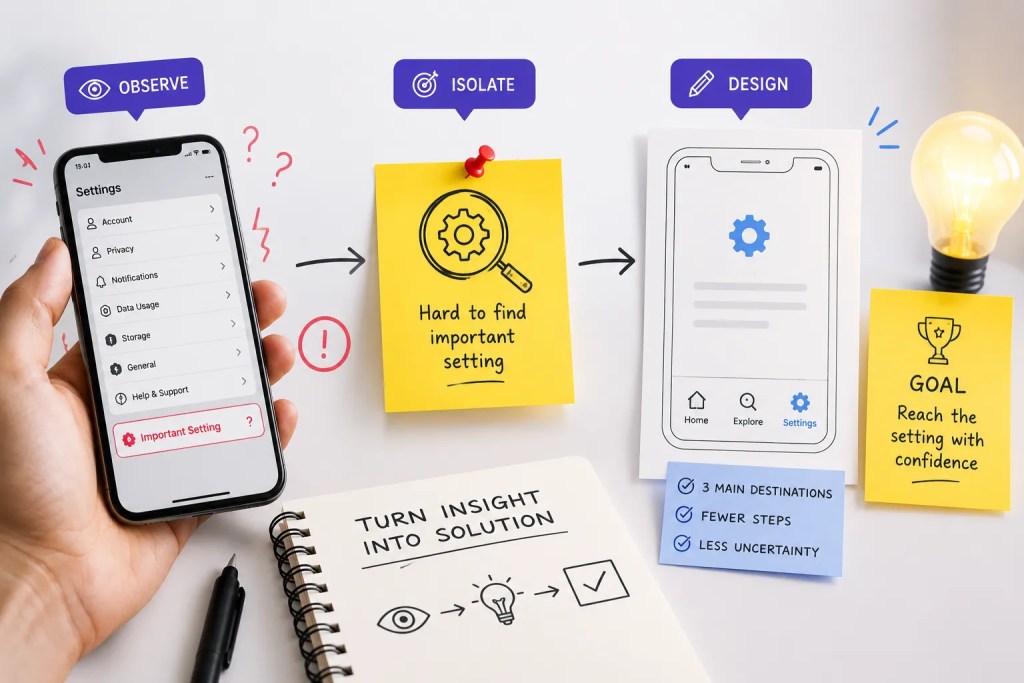
Observation becomes more valuable when you turn it into a small design challenge.
Suppose you notice that an app makes it difficult to find an important setting.
Don’t immediately recreate the entire application.
Instead, isolate the problem.
Try this:
Problem: Users struggle to locate an important setting.
Your task: Create a simpler navigation structure.
Constraint: You can use only three primary navigation destinations.
Goal: Help users reach the setting with fewer moments of uncertainty.
Suddenly, you’re not merely practising Figma.
You’re making decisions.
Moreover, constraints force you to prioritize rather than decorate.
That’s a crucial distinction between copying an interface and solving a UX problem.
Learn to Ask Better Questions About Interfaces
Strong designers don’t just look at screens.
They investigate them.
While using a product, consider:
- What is the user’s main goal?
- Which information deserves attention first?
- What could go wrong?
- How does the interface respond to mistakes?
- What happens after an action?
- Is the next step obvious?
- Could the same task be completed more simply?
These questions turn passive browsing into deliberate practice.
Eventually, you begin noticing patterns without consciously trying. A confusing form starts looking confusing. An unnecessarily long checkout becomes obvious. A poorly labelled button catches your attention.
That shift is one of the most important stages in learning UX.
When Should You Start Using Figma?
Figma is valuable, but timing matters.
A common beginner mistake is opening the tool before understanding the problem.
If you’re following a Learn figma UI UX design training course tutorial, don’t treat Figma as the destination. Treat it as the environment where your ideas become tangible.
Start with a rough sketch.
Then create a wireframe.
Afterward, turn the structure into a visual interface.
Finally, prototype the interaction.
This sequence keeps the focus on thinking rather than software.
Once you understand what you want to communicate, learning Figma becomes significantly easier because every feature has a purpose.
Can You Learn UI/UX Online Without Paying for Everything?
Yes, online resources can provide an excellent starting point.
Someone searching how to learn ui ux design online free can find tutorials, articles, community discussions, design documentation, and practical examples from experienced designers.
Nevertheless, free content has one major challenge: fragmentation.
One tutorial might explain typography. Another may demonstrate prototyping. A third could discuss user research. Yet, nobody necessarily tells you how these concepts connect.
Therefore, use free learning resources strategically.
A productive approach is:
- Learn one concept.
- Apply it immediately.
- Compare your result with real products.
- Seek feedback.
- Identify what you don’t understand.
- Then learn the next concept.
In contrast, collecting dozens of tutorials can create the illusion of progress without producing practical improvement.
Build Your Own “UX Observation Diary”
Here’s an exercise beginners can continue throughout their learning journey.
Create a simple document with five columns:
| Product | What Worked | What Confused Me | Why It Matters | My Idea |
|---|---|---|---|---|
| App A | Simple checkout | Address form | Slows completion | Reduce fields |
| Website B | Clear navigation | Hidden filter | Hard to discover | Improve visibility |
Every day, add one observation.
After a month, you’ll have dozens of real examples to analyse.
More importantly, you’ll begin developing your own design vocabulary.
This can become extremely useful later when you create projects because you will have trained yourself to identify problems before trying to solve them.
Don’t Copy Screens. Reconstruct Decisions.
Recreating an existing interface can help you understand spacing, hierarchy, components, and visual relationships.
However, copying should not become your entire practice method.
Instead, after recreating a screen, hide the original and ask yourself:
Could I create a different solution for the same problem?
That single exercise changes everything.
You stop asking what the original designer did.
Instead, you start asking what you would do and why.
That is where how to learn UI UX design from scratch becomes a question of developing judgment rather than collecting references.

A Simple Challenge to Start Today
You don’t need another ten-hour playlist to begin.
Pick one product you used today.
Then spend 20 minutes analysing it.
Write down:
- One thing that felt effortless.
- One thing that created friction.
- One decision the designer made well.
- One interaction you would change.
- One reason behind your proposed change.
Afterward, create a rough solution on paper.
Only then open Figma.
This small exercise can teach you more about design thinking than blindly recreating another polished screen.
Frequently Asked Questions (FAQs)
Yes. UX relies on observation, problem-solving, communication, and empathy alongside visual skills. A design background can help, but it isn’t the only path into the field.
Start by observing real products and identifying user problems. Then gradually introduce UX concepts, interface design, wireframing, prototyping, and usability testing.
Figma is widely used and valuable to learn, but software knowledge alone doesn’t make someone a UX designer. Understanding users and solving problems should come first.
Yes. Someone exploring how to learn ui ux design online free can build foundational knowledge through quality articles, tutorials, communities, and practical exercises. However, structured feedback can make the learning process more efficient.
Recreating interfaces can help you understand visual construction. However, you should eventually move from copying screens to analysing problems and creating alternative solutions.
Conclusion
The most useful answer to how to learn UI UX design from scratch isn’t a list of software, courses, or tutorials.
It starts with learning how to observe.
Use the products around you as your classroom. Notice friction. Question decisions. Compare experiences. Sketch alternatives. Test your assumptions. Gradually, your everyday interactions will start looking different.
That is the moment you begin developing a designer’s perspective.
And when you’re ready to turn those observations into structured projects, a Learn figma UI UX design training course tutorial can help you translate your thinking into interfaces, prototypes, and complete digital experiences.
Likewise, if you’re exploring how to learn ui ux design online free, use free resources as a foundation while prioritizing practice over passive consumption.
Ultimately, how to learn UI UX design from scratch is less about learning everything and more about learning to see what other people overlook.
That is where UX begins.
Stop Watching Tutorials. Start Designing for Real.
No coding. No confusing theory. Just practical UI UX skills, real projects, portfolio building, and mentorship that helps beginners become industry-ready designers.


Bidisha Sen
https://uiuxgrowthlab.comI’m a Lead UI/UX Designer and mentor with 3.5+ years of experience in UI/UX design. I transitioned into design after spending 5 years in IT business development, progressing from Business Development Executive to Senior Business Development Executive. Today, I combine my understanding of business, users, and design to help aspiring designers build practical skills and industry-ready portfolios.